LIGHTING
What is a gobo? Logo projection at events explained
A gobo is a template that shapes light into an image. Usually made from metal or glass, it sits inside a compatible lighting fixture, which projects the design onto a wall, floor or other surface. That design could be a company logo, a wedding monogram or a pattern across a stage.
For an event, a projected logo can give an entrance a clear identity without adding another freestanding sign. The result depends on more than the artwork, though. The surface, surrounding light and position of the fixture all have a part to play.
The gobo is the design; the fixture projects it
The two are sometimes bundled together under the phrase ‘gobo light’. It helps to separate them when planning: a custom logo gobo needs a suitable fixture, and the fixture needs a gobo in the correct size and material. A design that fits one light is not automatically suitable for another.
Some fixtures offer stock patterns, while others can take custom artwork. Before choosing a light from its effects list, confirm that it can accept the design you actually want to show. CHAUVET’s manufacturer guidance, for example, directs users to the individual model’s manual for compatible gobo sizes.
A gobo suits a fixed image or pattern. For a changing programme of presentation slides, photographs or video, a screen or video projector is usually the more useful starting point.
Choose the surface before the final artwork
A logo that looks clear on a laptop may look quite different across brickwork or a coloured wall. Texture can break up fine lines; the surface colour can change how projected colours appear. Start with a photograph of the actual area rather than treating every wall as a blank white screen.
Room lighting matters too. A projection has to remain visible against the light already falling on that surface. Rosco’s planning guidance considers ambient light, projection distance and the selected lens together. That’s why the room and the intended image size need to be considered together.
Think about the view guests will have. At an entrance, people may walk across a floor projection; behind a speaker, furniture or the presenter may obscure it. A smaller, well-placed logo can do more than a large one competing with everything around it.
Does the logo need a steel or glass gobo?
Steel can suit a simple design, but enclosed parts of letters or symbols need small connecting bridges to hold them in place. Rosco calls this ‘tabbing’. Those connections become part of the projected image, so they deserve a look when approving the artwork.
Glass allows detail and colour that a cut metal template cannot reproduce in the same way. That does not mean every logo needs a full-colour glass version. Decide whether the event needs the exact colour treatment, a single-colour mark or a simpler version that reads clearly from a distance.
Ask for a proof before manufacture, with enough time to resolve any changes. For a colour-critical design or a difficult surface, discuss a physical projection test as well: a digital proof cannot show every effect of the venue, lens and lighting. An awkward projection angle may also need to be allowed for in the artwork.
A real example: the SISK entrance at McGovern Park
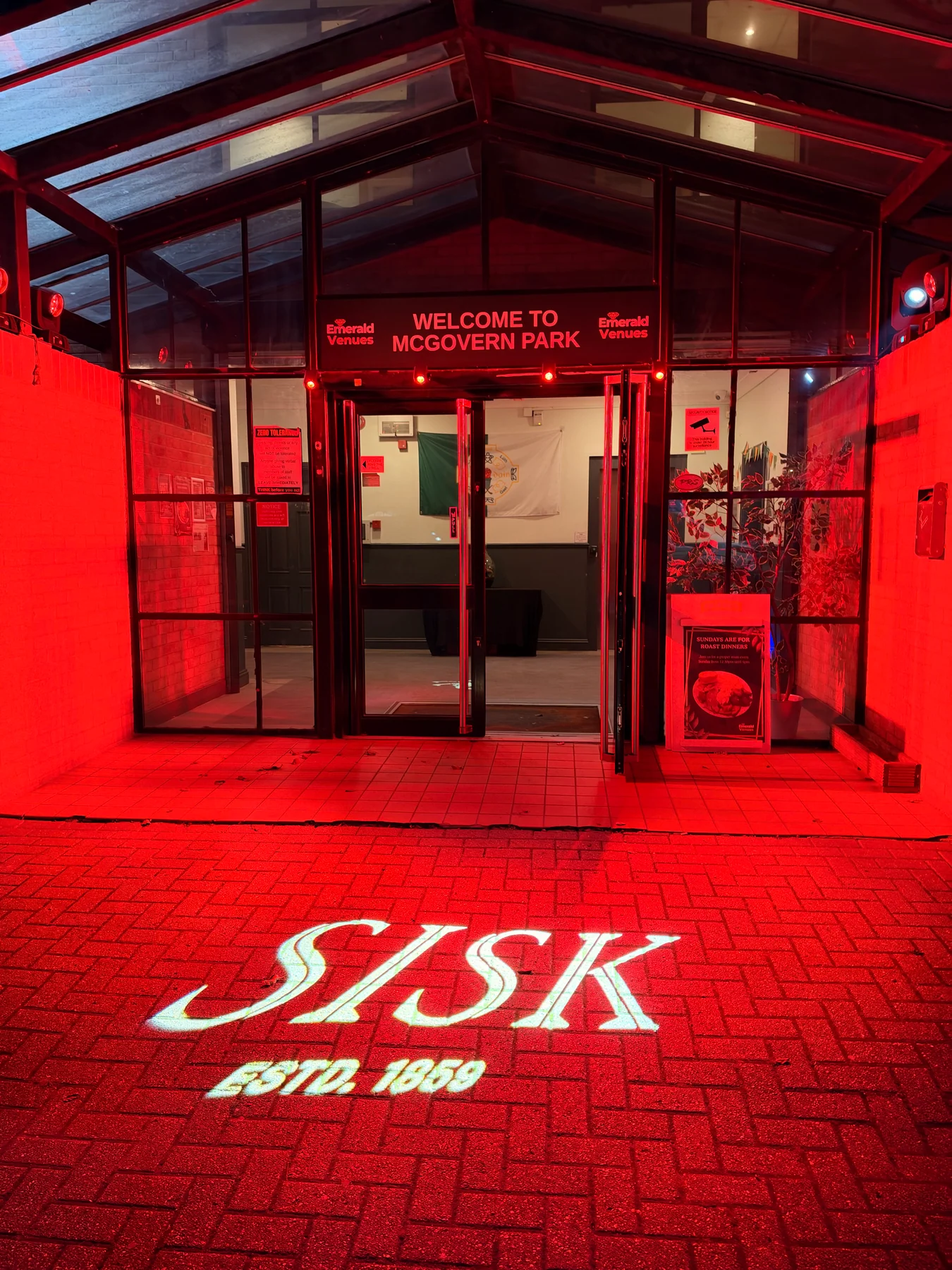
For SISK’s charity fundraiser at McGovern Park in Ruislip on 5 November 2026, we supplied entrance lighting and a branded gobo projection alongside the production and room dressing for around 200 guests. The photograph shows the SISK logo on the paving, with red light around the entrance.
Inside, the branding continued through the pillar covers, bespoke table centres and presentation set. The entrance projection was one part of that wider design. It gave the arrival area its own treatment while keeping the same identity as the room beyond.
What is worth agreeing before booking?
You do not need to choose the gobo material or lens yourself. These are the details that help the lighting team work out a suitable approach:
- The approved logo file, any brand-colour requirements and whether a simplified version is acceptable.
- The intended surface, approximate image size and photographs showing the surrounding lighting.
- Where guests will see it, whether the image should stay still, and any venue restrictions on positioning equipment.
- The artwork approval deadline and whether the quote includes the custom gobo, suitable fixture, installation and a check in the event lighting.
TAKE THIS INTO YOUR BRIEF
Start with where the logo will be seen. A clear design, suitable surface and well-chosen fixture matter more than making the projection as large as possible.
Sources & useful reading.
- Rosco: planning logo projection
How ambient light, lens choice and projection distance affect a logo, with advice on choosing a surface. Checked 10 November 2026.
- Rosco: custom steel gobos
Artwork tabbing and how to specify the correct gobo size for a lighting fixture. Checked 10 November 2026.
- Rosco: the art of gobo design
Material choice, projection angles, artwork proofs and testing a projection in its intended setting. Checked 10 November 2026.
- CHAUVET Professional: gobo projectors
Custom-gobo compatibility and why exact size specifications should be checked against the fixture manual. Checked 10 November 2026.
- Our work: SISK’s charity fundraiser at McGovern Park
Our entrance lighting and logo projection as part of SISK’s charity fundraiser at McGovern Park.
Put it into practice.
If you’re planning an event, send the date, venue and what you know so far. We’ll help work through the rest.
Talk through your eventA little more useful reading.
LIGHTING
Wash, spot or followspot? Start with what the audience needs to see
Understand wash lights, moving spots and operated followspots, then build an event-lighting brief around visibility, atmosphere and performance.
Read the guide
LIGHTING
Wireless uplighting: the questions that make the room work
Plan wireless event uplighting around the room, colours, runtime and control, with practical questions to ask before choosing a fixture count.
Read the guide
EVENT PLANNING
What is a lectern, and which one suits your event?
A lectern holds a speaker’s notes. Here’s how to choose one around the presenter, working surface, microphone and branding, with a real conference example.
Read the guide